Home » Security » PHP Security Update: Patch CVE-2026-109618 and CVE-2026-109619
PHP Security Update: Patch CVE-2026-109618 and CVE-2026-109619
Short answer: update PHP to 8.5.12, 8.4.27, 8.3.36 or 8.2.35 today, then restart PHP-FPM or Apache. These versions fix two critical remote code execution vulnerabilities, CVE-2026-109618 and CVE-2026-109619.
On 21 October 2026 the PHP Foundation shipped a coordinated security release fixing two critical flaws in PHP itself. Both can let an unauthenticated attacker run code on the server under the right conditions. Because they sit in the language runtime, every site on an unpatched server is exposed, whatever CMS or framework it uses.
What the PHP vulnerabilities are
| CVE | What goes wrong |
|---|---|
| CVE-2026-109618 | If a request hits memory_limit at the wrong moment, PHP can leave partially initialised internal data and later treat it as valid, corrupting memory. |
| CVE-2026-109619 | A fatal error at the wrong point can leave internal state pointing at memory from a previous request. A later request on the same worker can then use freed memory. |
The PHP Foundation scores the issue at CVSS 9.2. Its write-up says the first flaw can be triggered on Apache with mod_php before any application code runs, and that code execution was also confirmed on PHP-FPM through application-level code paths. Treat both setups as at risk.
Which PHP versions are patched
Update to at least one of these:
- PHP 8.5.12
- PHP 8.4.27
- PHP 8.3.36
- PHP 8.2.35
Older branches (8.1, 8.0, 7.4) are not in that list. Some distributions backport security fixes, so ask your host or check your OS vendor's advisory. If neither can confirm a fix, plan an upgrade to a supported branch.
Why you should patch PHP now
Details leaked before the planned release. CVE IDs began circulating on 20 October with a wrong release time and an incorrect score, and the project brought the coordinated release forward to 21 October. Amazon was reported to say the flaw was being exploited in the wild soon after. Assume attackers are scanning for unpatched servers now.
The whole process comes down to four steps:
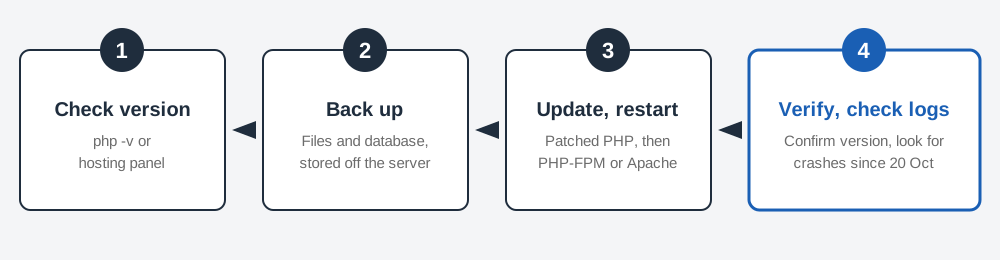
Step 1: find your PHP version
- Hosting panel: cPanel, Plesk and most managed hosts show the PHP version under a "PHP" or "MultiPHP" section.
- SSH: run
php -v. This shows the command-line version, which can differ from the one your web server uses. - From the web server: create a temporary file containing
<?php phpinfo();in a protected location, load it once, read the version, then delete it. Never leave it online. - WordPress: Tools → Site Health → Info → Server shows the PHP version.
Step 2: update
- Shared or managed hosting: switch to a patched PHP version in the panel, or ask support to confirm the fix is applied. Do this today.
- Your own server (Debian or Ubuntu):
sudo apt update && sudo apt upgrade php*. On other systems use your package manager or your PHP repository (for example Ondřej Surý's PPA or Remi's repository). - Docker: pull a fixed base image, such as
php:8.4.27, rebuild your image and redeploy. Rebuilding is needed because an old image keeps the old PHP.
Take a backup first (see website backups). Major version jumps can break plugins, so test on a staging copy if you can. A move within the same branch, such as 8.3.35 to 8.3.36, is low risk.
Step 3: restart and verify
- Restart the service so running workers load the new build:
sudo systemctl restart php8.4-fpmor restart Apache if you usemod_php. - Re-run
php -vand confirm the patched number. If you rely on backported fixes, compare the package changelog against the CVE IDs instead. - Load your site and check for new errors. A fatal error after an upgrade is usually an incompatible plugin (see the PHP error guide).
Step 4: look for signs of abuse
If your server was unpatched on or after 20 October:
- Review web server and PHP-FPM logs for a spike in requests that end in worker crashes, segfaults or out-of-memory fatal errors.
- Look for PHP files you did not upload, especially in upload folders, and for recently changed core files.
- Check for new admin users and unfamiliar scheduled tasks.
- If anything looks wrong, restore from a clean backup, rotate passwords, API keys and database credentials, and ask your host to scan the account.
How to keep PHP secure
- Turn on automatic security updates for the OS packages that include PHP.
- Keep CMS core, plugins and themes current too. Fixing PHP does not fix a vulnerable plugin (see outdated CMS and plugins).
- Run a supported PHP branch. Once a branch reaches end of life, it stops getting official fixes.
- Keep a tested, recent backup you can restore quickly.
Common mistakes
- Updating plugins and assuming the PHP flaw is fixed. It lives in the server runtime.
- Updating PHP but not restarting PHP-FPM or Apache, so old workers keep running.
- Checking only the CLI version when the web server uses a different PHP.
- Leaving a
phpinfo()file on the server after checking the version. - Waiting for a convenient maintenance window while exploits are active.
Sources
Frequently Asked Questions
Which PHP versions fix CVE-2026-109618 and CVE-2026-109619?
PHP 8.5.12, 8.4.27, 8.3.36 and 8.2.35. If you run an older branch such as 8.1 or 7.4, ask your host or distribution whether they have backported the fix, and plan a move to a supported branch.
Is my site affected if I only use WordPress or another CMS?
Yes, if the server runs an unpatched PHP. The flaws are in PHP itself, not in your CMS, so updating plugins does not fix them. The PHP version on the server is what matters.
How do I know whether my host has already patched?
Check the PHP version in your hosting panel or with php -v. Because distributions often backport fixes without changing the version number, also check your host's security notice or your OS package changelog.
Do I need to do anything besides updating PHP?
Restart PHP-FPM or Apache after the update so running workers load the new build, then review your logs for unusual requests from 20 October onward and keep a recent backup.
Found a mistake or still stuck? Contact us. See how we write and check these guides in our editorial policy, or read about DocumentGuy.